Building an Agent Native SEO Department
A manager agent and three specialists turned Airtable briefs into Framer articles approved by humans and ready for production, including research, detailed copy, SVG infographics, video embeds, and internal links.
- Articles produced
- 40+
- Published first wave
- 7 to 8
- Typical production cycle
- ~90 min
- Human writing
- 0%
This was not a writing demo. I designed an agent native SEO production department: a system that could take a structured brief, coordinate specialized agents, assemble an article with rich media, move it through human approval, and publish it into a real company’s CMS.
The production claim is intentionally specific: 40+ articles were produced, 7 to 8 entered the first public rollout, and a typical article took about 90 minutes to create. The article copy and infographics were generated by agents; humans reviewed and approved the package before publication.
Published evidence
The output is public, not hypothetical.
The live article shows the actual content package: detailed structure, custom SVG infographics, embedded video, internal links, FAQs, and conversion paths.
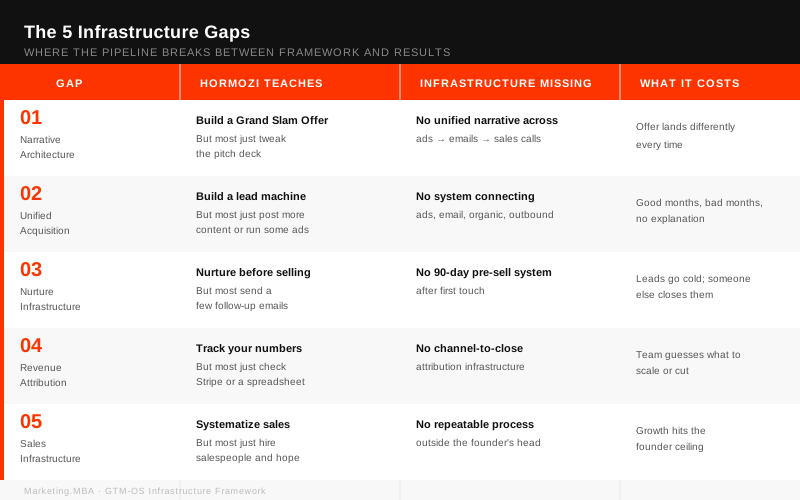
A production SVG embedded inside the published Marketing.MBA article.
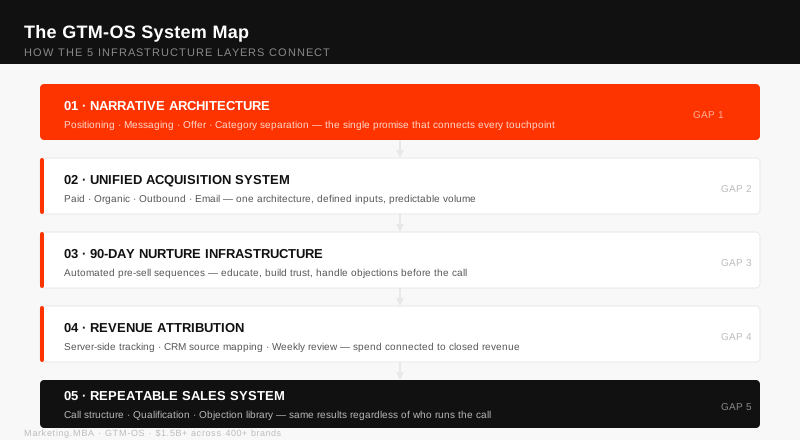
A second visual, specific to the article, generated and packaged by the same workflow.
The business reality
The hard part was not prompting a model to write. It was fitting autonomous work into an operating business: managers needed control over what entered production, reviewers needed clear approval boundaries, and the existing Framer CMS needed to remain the publishing surface.
That meant solving for coordination and accountability as much as content quality. The system had to produce a complete article package, expose it to a human at the right moment, and keep publication operationally simple enough that a manager could run it from Airtable.
System architecture
System architecture
A control plane around a four agent production cell
- Airtable control planeBriefs, production state, and controls for managers.
- Manager agentPlans the run, delegates work, and assembles the result.
- Three specialistsProduce the research, article, rich media, and packaging work.
- Human approvalA person gates the finished package before it can go live.
- Framer proxyTransforms approved output into a Framer CMS publication.
The moving signal illustrates orchestration, not a fixed linear runtime. Agents can hand work back for revision before the approval boundary.
The separation was deliberate. Airtable acted as the operational control plane, agents handled production, the approval gate retained editorial accountability, and the custom proxy isolated publication logic specific to Framer from the agent workflow.
System evidence
The run is inspectable at every boundary
These interfaces document the manager contract, the versioned writer skill, a real research trace across multiple tools, and the persistent artifact produced by the run.
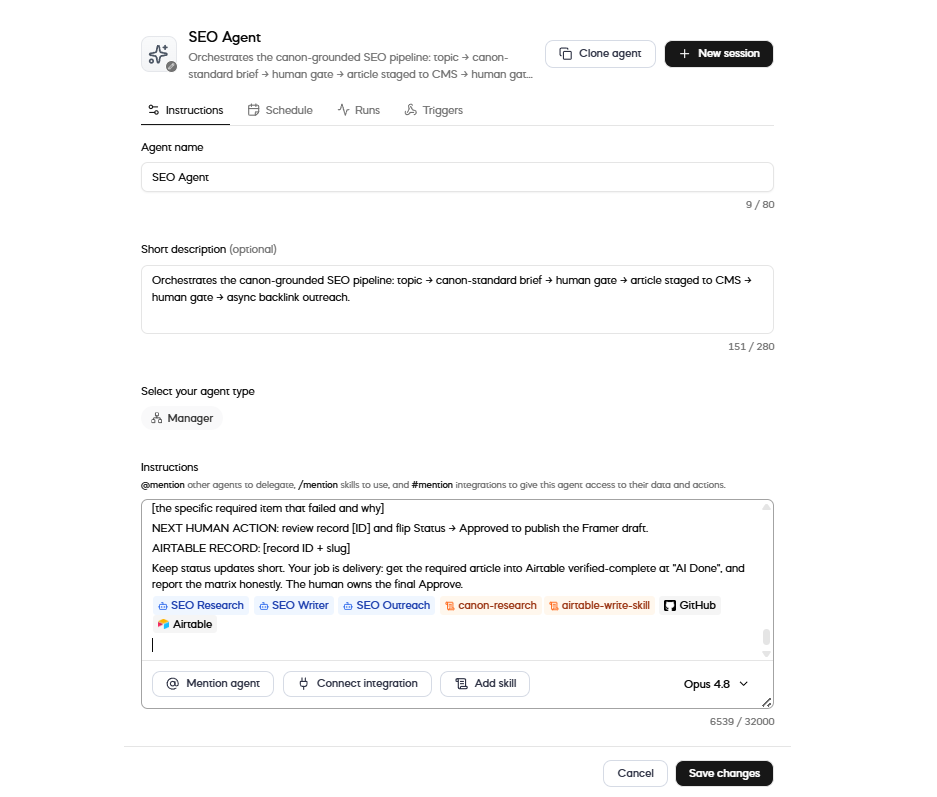
The SEO manager names its research, writing, and outreach specialists; attaches canon and Airtable skills; and explicitly stops with the final approval owned by a human.
Open full size evidence →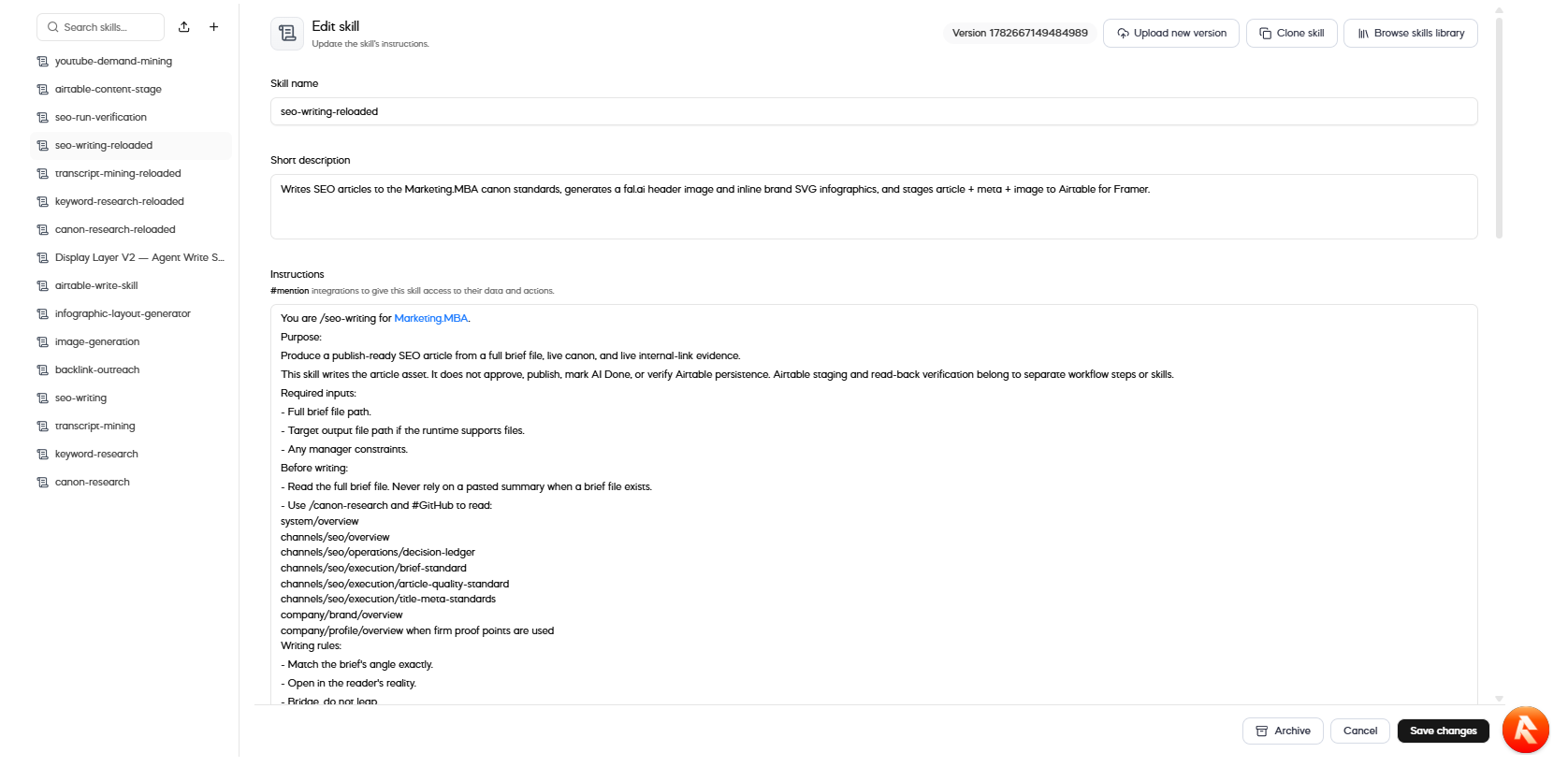
The versioned writing skill defines its inputs and canon sources, then states that it writes the asset but does not approve, publish, mark completion, or verify persistence.
Open full size evidence →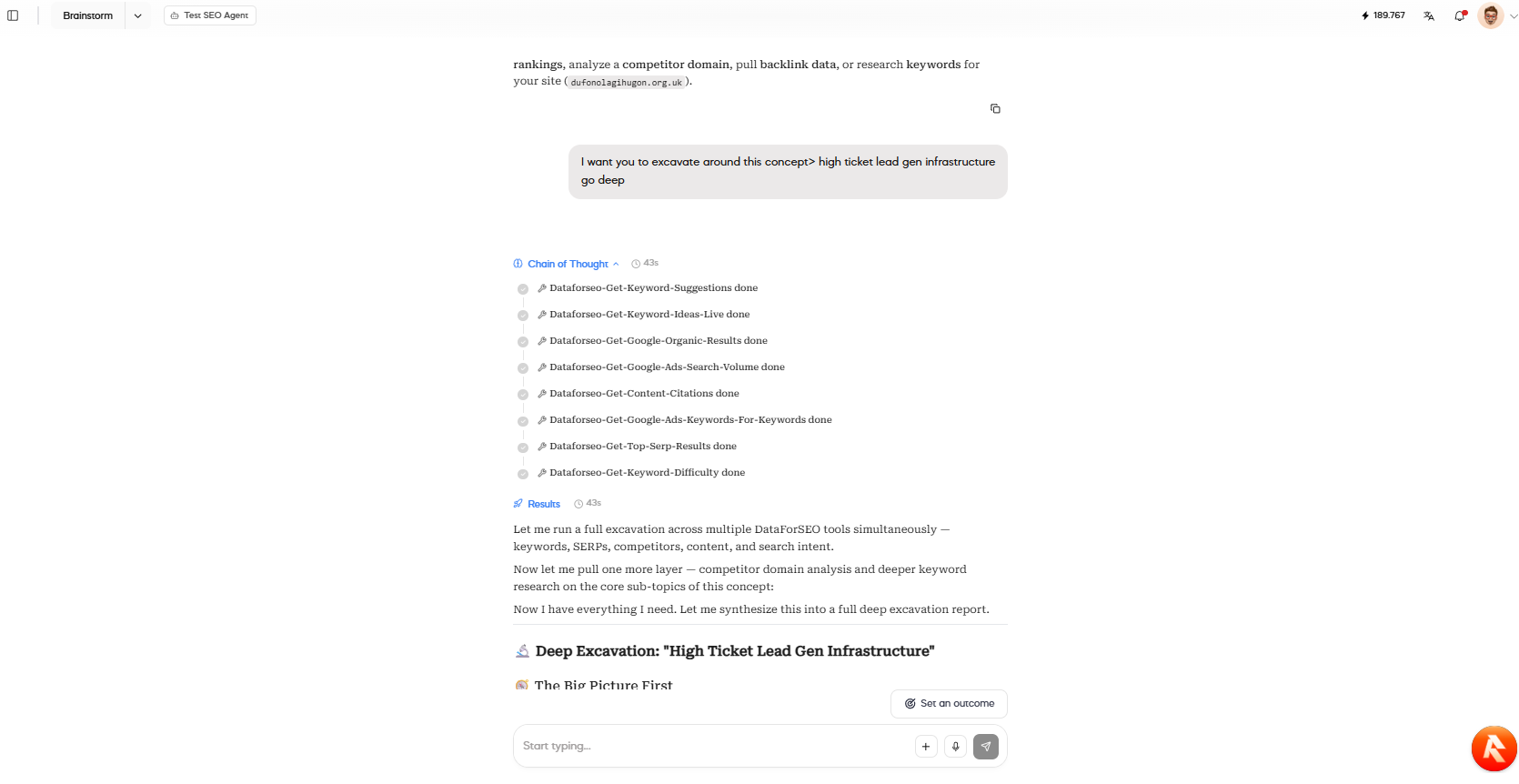
A single research run records completed DataForSEO calls across keywords, search volume, citations, SERPs, competitors, and difficulty before synthesis.
Open full size evidence →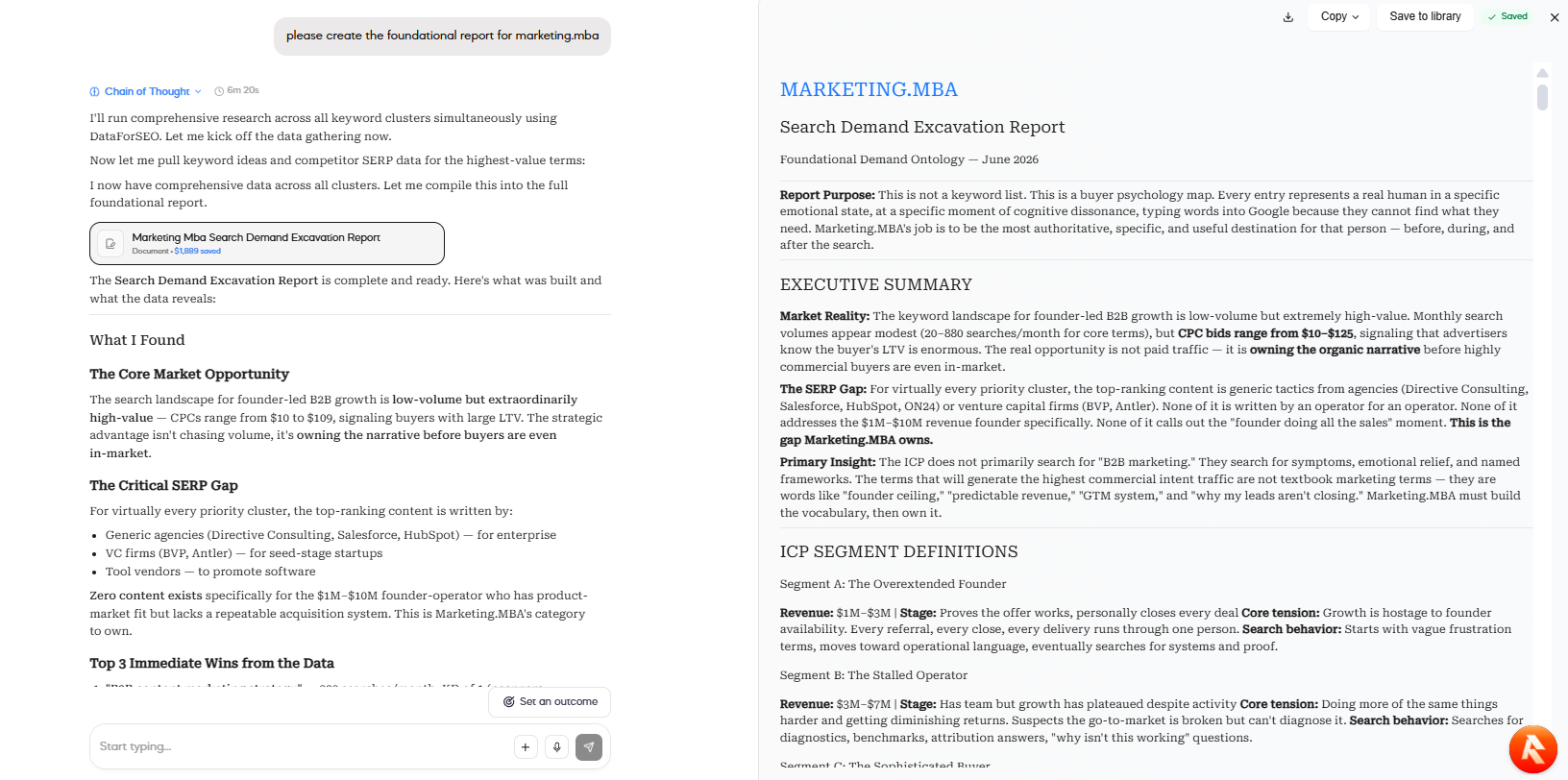
The run produced a structured Search Demand Excavation Report as a reusable artifact, preserving the market model and evidence for downstream writing rather than handing off a short chat summary.
Open full size evidence →One article, end to end
One article, end to end
From a queued brief to an article ready for the CMS
- 01Queue the brief
A manager creates or updates the production item in Airtable.
- 02Plan and delegate
The manager agent decomposes the job and routes work to three specialized agents.
- 03Build the content package
The system produces detailed copy, SVG infographics, video embeds, internal links, and page structure.
- 04Review the whole artifact
A human reviews the assembled article rather than supervising every generation step.
- 05Publish through the proxy
Approved fields are transformed and sent into the existing Framer CMS workflow.
Engineering decisions
The architectural value sits in the boundaries: where control lives, how work is split, and what an agent is never allowed to decide by itself.
Use Airtable as the operating interface
- Constraint
- The system had to fit the team's daily operating reality, not require employees to learn an agent framework.
- Decision
- Expose briefs, states, and approval actions in Airtable while keeping orchestration behind the interface.
- Consequence
- Managers could operate the production system from a familiar control plane, while the implementation remained replaceable.
Separate orchestration from specialist work
- Constraint
- A single prompt had to cover research, detailed structure, rich media, linking, and publication packaging.
- Decision
- Use one manager agent to coordinate three specialized agents and assemble their outputs.
- Consequence
- Each capability could evolve independently without turning one prompt into the entire production department.
Put Framer behind a publication proxy
- Constraint
- Framer CMS was the required destination, while Airtable was the operational source of truth.
- Decision
- Build a custom proxy that translated approved output from Airtable into Framer CMS operations.
- Consequence
- Mechanics specific to the CMS were isolated from content generation, and publication could be triggered from the production workflow.
Keep the final boundary human
- Constraint
- The system was creating public, branded assets for a real business.
- Decision
- Automate production end to end, but require human approval before publication.
- Consequence
- People retained accountability for what went live without becoming the writing bottleneck.
The prompt contracts
The current “Reloaded” prompt set made the architecture operational. Writing, persistence, verification, and approval were separate responsibilities, while file artifacts preserved the full handoff between agents.
Prompt evidence
The architecture was encoded as enforceable roles.
Selected exact lines from the internal production prompts show the control boundaries behind the diagram. These are implementation evidence, not reconstructed marketing copy.
You do not do the specialist work yourself unless a tool or delegation failure makes that impossible. You are still accountable for confirming that the work actually happened.
The Writer reads the file in full, so the file is the source of truth.
This skill writes the article asset. It does not approve, publish, mark AI Done, or verify Airtable persistence.
You may set Status to "AI Done" only after all required acceptance checks pass. You must never set Status to "Approved" or "Published".
Excerpts retain the original wording. Only architectural instructions are shown; operational identifiers, credentials, and client data are excluded.
Production evidence
The important questions were operational: could a long run preserve state, could specialist outputs be assembled consistently, could rich media survive the handoffs, and could publication be retried without turning the CMS into a mess?
The prompt contracts, skill configuration, execution trace, artifacts, Airtable state, and live article document the control model directly. Together they establish delegated production, separation between generation and approval, structured persistence, rich media packaging, and publication into the live CMS. They do not establish long term SEO impact or reconstruct the proxy’s complete failure lifecycle, so those claims are excluded.
Internal system evidence
The production system behind the articles.
These are real Airtable production views, not staged mockups. They expose the workflow, structured content fields, publication state, and generated media payloads behind the public output.
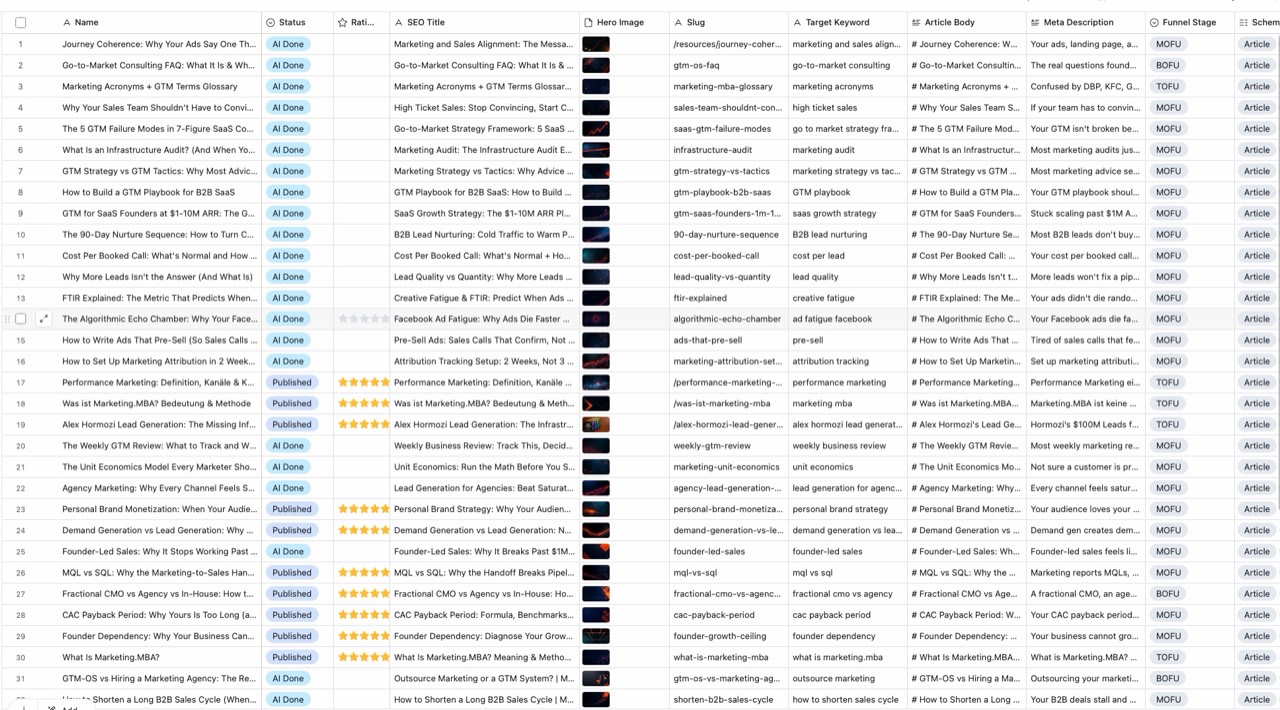
The working production table shows articles marked complete by AI or published alongside their SEO title, hero image, slug, target keyword, article body, metadata, funnel stage, and schema fields.
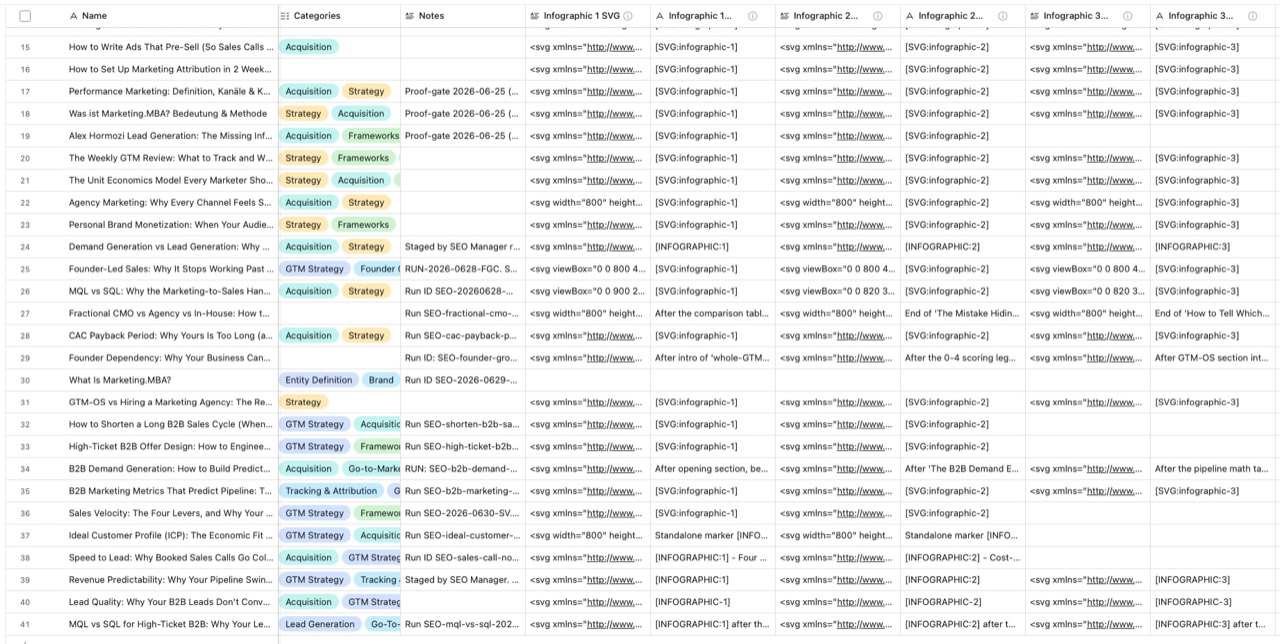
The article queue carries multiple structured SVG fields per record, with placement instructions and production notes stored beside the content.
Outcome
The system produced more than 40 articles and moved 7 to 8 through the first publication wave. The first pages began generating impressions within days, but the rollout ended during an organizational transition before the measurement window was long enough for traffic or revenue attribution.
This case study therefore makes no claim about sustained traffic or revenue impact. It demonstrates a working production architecture, a public output artifact, a typical production cycle of about 90 minutes, and the operational design required to put work generated by agents in front of a real audience.
Evidence boundaries
- The measurement window was too short to attribute sustained SEO or commercial impact. Early impressions are treated as a signal, not an outcome.
- The public article establishes output quality and media packaging. The internal screenshots and prompt contracts establish the orchestration model.
- The public evidence does not establish the proxy’s exact retry lifecycle, so no recovery claim is made.
- The visible 43 second trace documents one research run. The 90 minute figure is the observed typical article cycle, not a duration derived from that trace.
What this system proves
Production agents are not defined by how impressive one generation looks. They are defined by whether the surrounding system can coordinate work, preserve accountability, integrate with existing tools, and reliably turn an approved artifact into something the business can use.
Where this work led: Gomnee.
The lessons from building production agents now shape Gomnee, which helps experts get found in search and AI for what they know.
See Gomnee